What's new in ZXBuilder 5.8.0.0 This release adds four items, all for one purpose: letting the USD files ZXBuilder produces be matched to equipment in AVEVA PI Asset Framework (PI AF). 1. A set of PI AF semantic fields in the USD file 2. ZXBuilder reads the PI AF mapping table in your standard package 3. A new ribbon button: "IoT Map Export" 4. When importing back to Revit, AF mapping data is written to shared parameters ⚠ These four items are implemented in 5.8.0.0; acceptance verification is not yet complete, and the verification result for each item will be provided separately in writing. Please do not use any item on this page as an acceptance basis at this stage. See the documents released with this version in the download section.
Upgrade note:Just double-click v5.8.0.0 MSI to upgrade. If About Dialog shows License inactive after upgrade, please re-paste your original license.txt.
⚠ Pre-Beta · Signed with an EV code-signing certificate — the publisher now shows as Reality Matrix AI Inc. Windows SmartScreen may still show an "unrecognized app" prompt on a newly released build (download reputation, not the signature): click More info → Run anyway. Trial access is NDA-bound · do not redistribute.
OpenUSD Native · USD↔Revit · Autodesk Revit 2027
Bidirectional USD↔Revit for Industrial Digital Twins
OpenUSD holds the industrial digital twin. Your MEP team works in Autodesk Revit. ZXBuilder bridges them — bringing USD precision into Revit, and syncing Revit MEP back to USD.
1
Download & Install
Run MSI installer. Zigma tab appears in Revit.
2
Get Machine Code
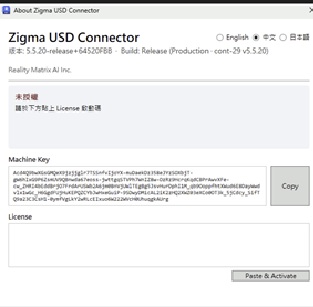
Click About in Zigma tab. Copy your Machine Code.
3
Get Free Trial
Paste Machine Code below. Get 7-day trial key instantly.
4
Activate & Go
Enter key in Zigma About dialog. Start converting.
How to Find Your Machine Code
Two simple steps inside the Revit Zigma tab:
1
Open About in Zigma Ribbon
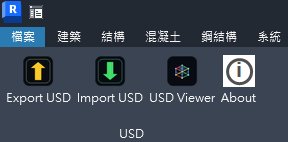
In Revit, click the Zigma tab on the ribbon, then click the About button.
2
Copy Machine Code from About dialog
In the About dialog, choose your language, copy the Machine Code, then fill in the form below and submit.
🎁 Free Trial License — 7 Days
Fill in the form below to request your free trial — no credit card:
7 Days
20 Export+Import Ops
10K Elements per Operation
Submit your Machine Code with contact info. Your trial license key will be emailed within 1 business day.
✅
Trial Request Submitted!
Thank you! Your trial request has been sent to our team. We will email your trial license key within 1 business day. Questions? Contact michael.lin@realitymatrixai.com
Pricing
All licenses are issued by our team. Contact us to get started.
Enterprise
Contact Sales
1,000 import/export operations Up to 20,000 elements per operation Priority support & training Works offline — no network required
Beyond the downloadable Revit plug-in, Reality Matrix AI Inc. provides the following software services under the ZXBuilder name.
Online Licensing & Trial-Key Service
A hosted service operated by Reality Matrix AI: submit your Machine Code on this site and the ZXBuilder license service issues a 7-day trial key. Enterprise and Individual licenses are issued and activated through the same service.
Software Design & Development
We design, develop and maintain ZXBuilder — computer software for converting, translating and exchanging 3D model and BIM data between OpenUSD and Autodesk Revit — and develop customer-specific USD part libraries (ZF USDC) and USD ↔ Revit data-exchange workflows on request.
Software Updates & Maintenance
Regular ZXBuilder releases with What's New notes, corrective updates, and maintenance for licensed customers. Upgrade by installing the latest version.
Technical Consulting, Integration & Training
Consulting on USD ↔ Autodesk Revit deployment for industrial digital twins, integration support for your BIM and OpenUSD pipelines, and training for engineering teams. Priority support & training are included with Enterprise licenses.
 Companion tool — ZX Fab Standard Manager, ZXFSM Latest Version: 0.6.0.0-r1 (Fab Standard Manager)